CODI is built to catch COPD getting worse, 1 to 3 days before the patient feels it.
How it started
A senior colleague of mine is a Korean Medicine specialist in respiratory disease. When I visited his office, he and his professor were researching how to manage patients' symptoms at home after they leave the hospital. They were thinking about an app.
I offered to build the digital side. He brought the specialist medical knowledge. I brought the product concept, the business model and the design. Over several meetings with him, CODI went from the first idea to a prototype a future team could build on.
The name comes from COPD + Diary: every morning, the patient keeps a short spoken diary of how they're breathing, and CODI reads the changes.

Working on CODI: one of our planning sessions.
Expected impact
Two apps, one signal
CODI connects two people: a COPD patient, living with a lung disease that's managed for life, and the hospital coordinator who tracks their recovery. One app for the patient, one dashboard for the hospital's coordinator, connected from the moment they leave the hospital.
Patients speak into their phone for 30 seconds each morning. How they sound shows how they're breathing: shorter phrases, more pauses, a rougher voice. The app also pulls data from their phone and Apple Watch, all of it feeding into one CODI Score.
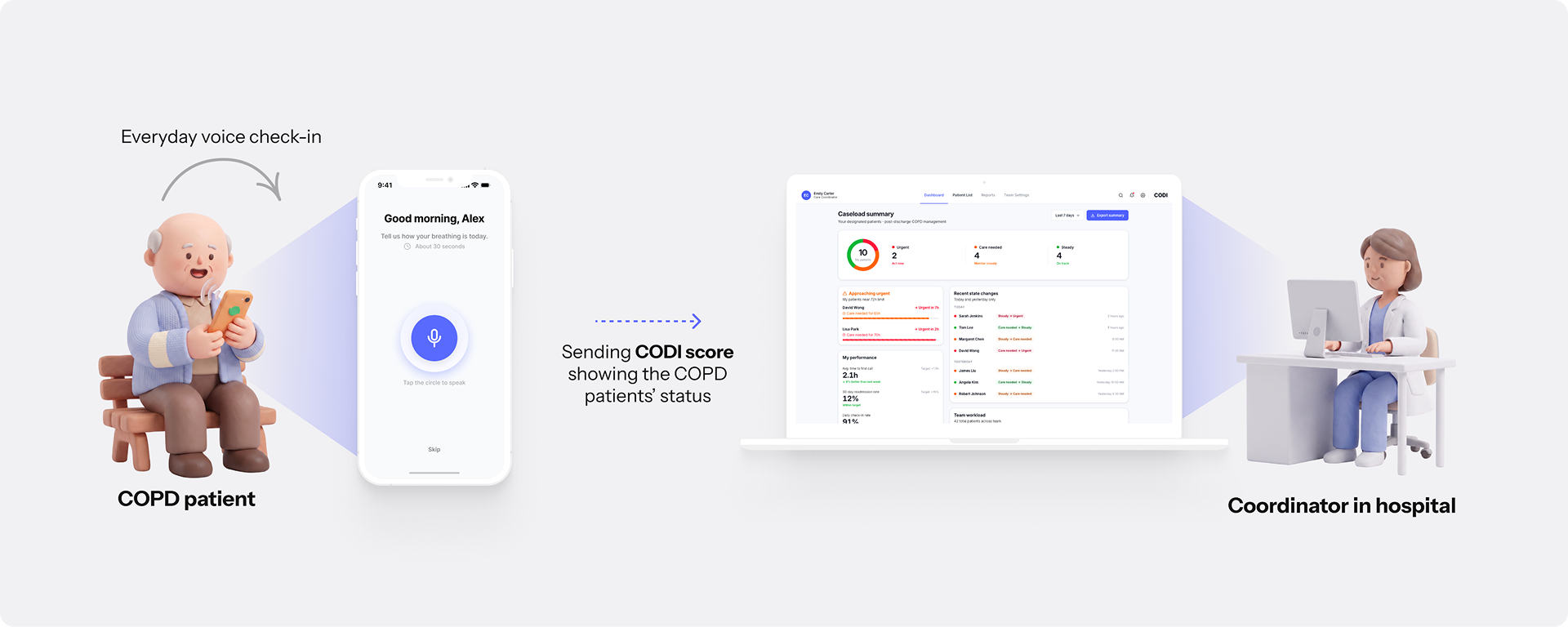
That score splits two ways:
Sees one simple status each morning, steady or care needed, and what to do next.
Sees the score and the reasons for every patient on their list, and decides who to call first.
Why this works as a business
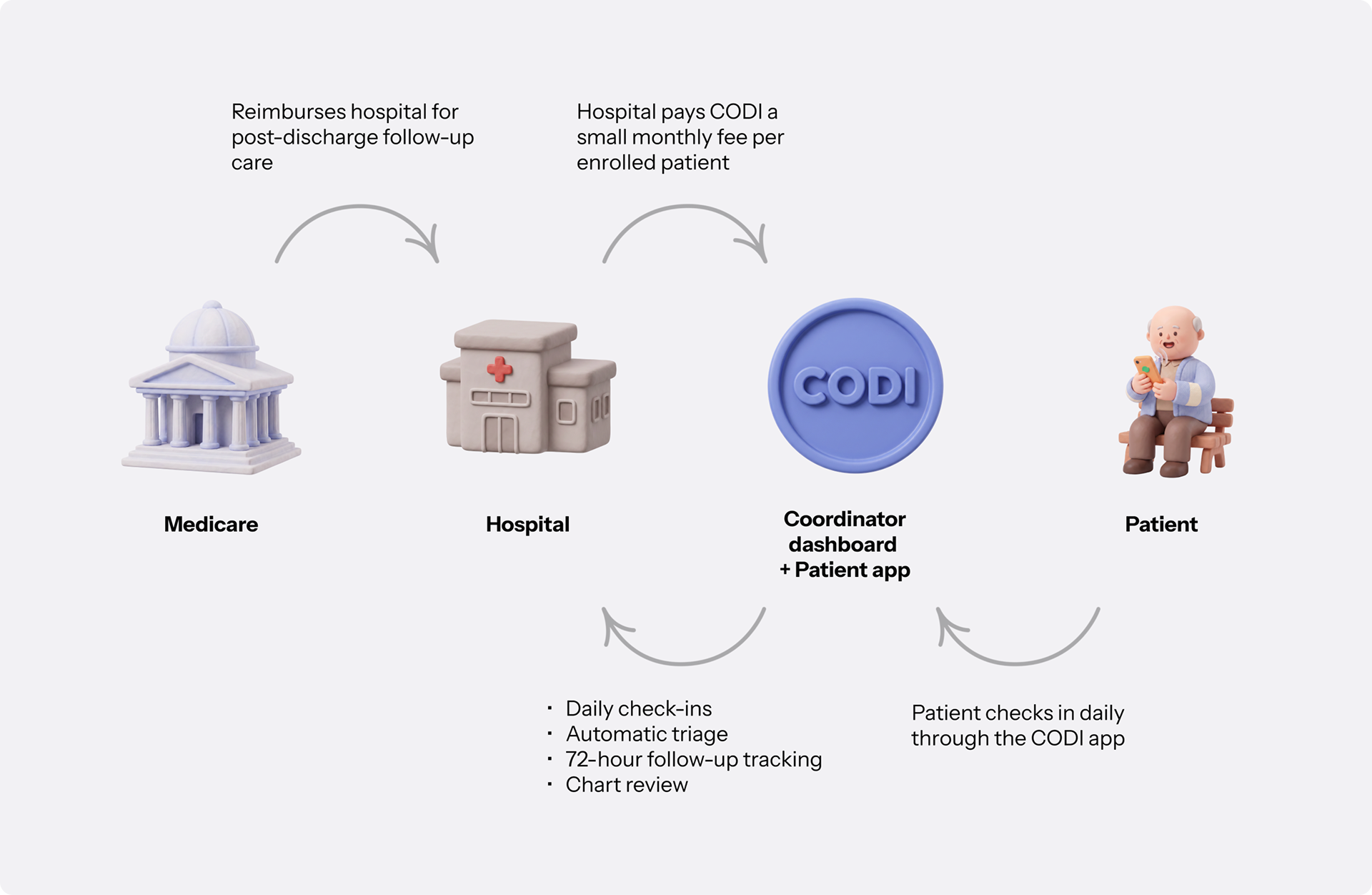
1 in 5 COPD patients return to the hospital within 30 days. Medicare penalizes hospitals for it, cutting up to 3% of their Medicare base payments.
Medicare already pays hospitals $200–270 per patient for follow-up care in the 30 days after discharge (Transitional Care Management).
CODI makes that follow-up work, and the hospital pays CODI a small monthly fee per patient.
The professor was interested in the US market, so I built the business model on the US system.
This is CODI's business model:
Who this is for
Next, I needed to know who I was designing for. So I built two personas: one for the patient app, one for the coordinator dashboard.
- Patient (Walter): a systematic review of 31 qualitative COPD studies on PubMed found patients want a simple daily read on how they're doing, plus clear next steps when something's wrong.
- Nurse (Sarah): a nurse coordinator who watches the dashboard for about 10 patients and decides who to call first. Without CODI, that means checking five different systems, and often finding out too late.
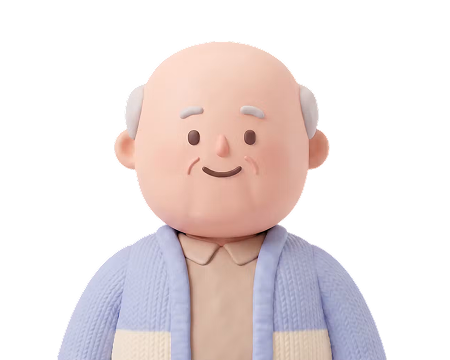
- Recover safely
- Stay independent
- Know whether today's symptoms are normal
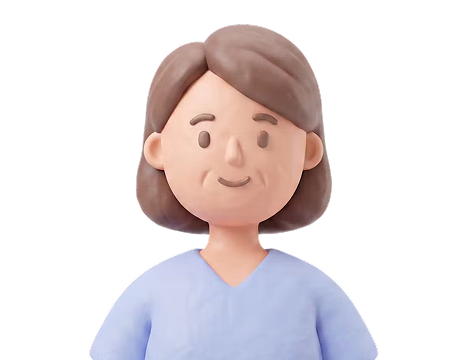
- Know who needs attention first
- Understand why, fast
- Decide what to do next quickly
Walter needs one quiet question answered every morning. Sarah needs one loud question answered every day: who first.
Strategy & the hard problem first
"What could show someone their lung condition was getting worse, from home, without a hospital's equipment?"
To answer that, I made one number that shows how a patient is doing each day: the CODI Score, from 0 to 100. It combines six signals from the patient's phone and Apple Watch, and each signal has its own weight.
The table shows where each signal comes from.
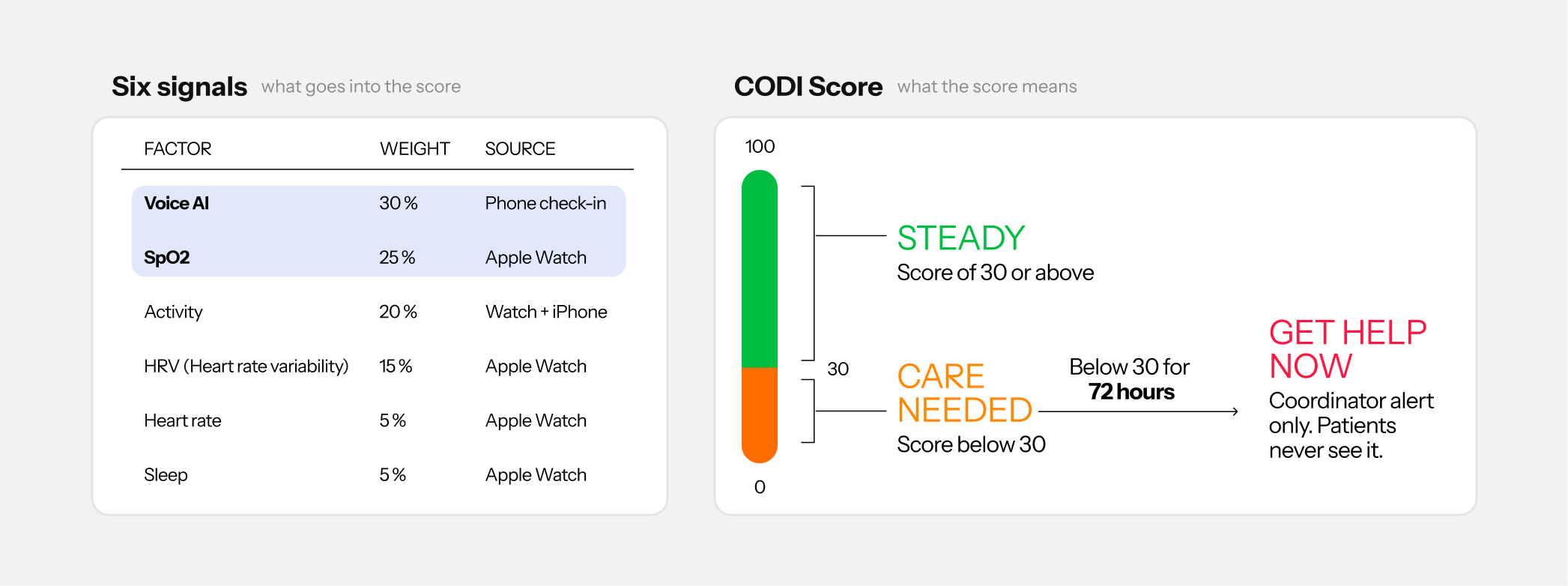
Voice changes with breathing, and AI voice analysis (voice biomarkers) is a growing research area on PubMed. CODI compares each check-in with that patient's own usual voice, so it can catch changes a stranger would miss. That's why voice has the highest weight.
SpO2 is how much oxygen your blood is carrying, read by a light sensor on the Apple Watch. My colleague, the respiratory specialist, said SpO2 is the first thing he checks in any respiratory patient, so it's the second-highest weight.
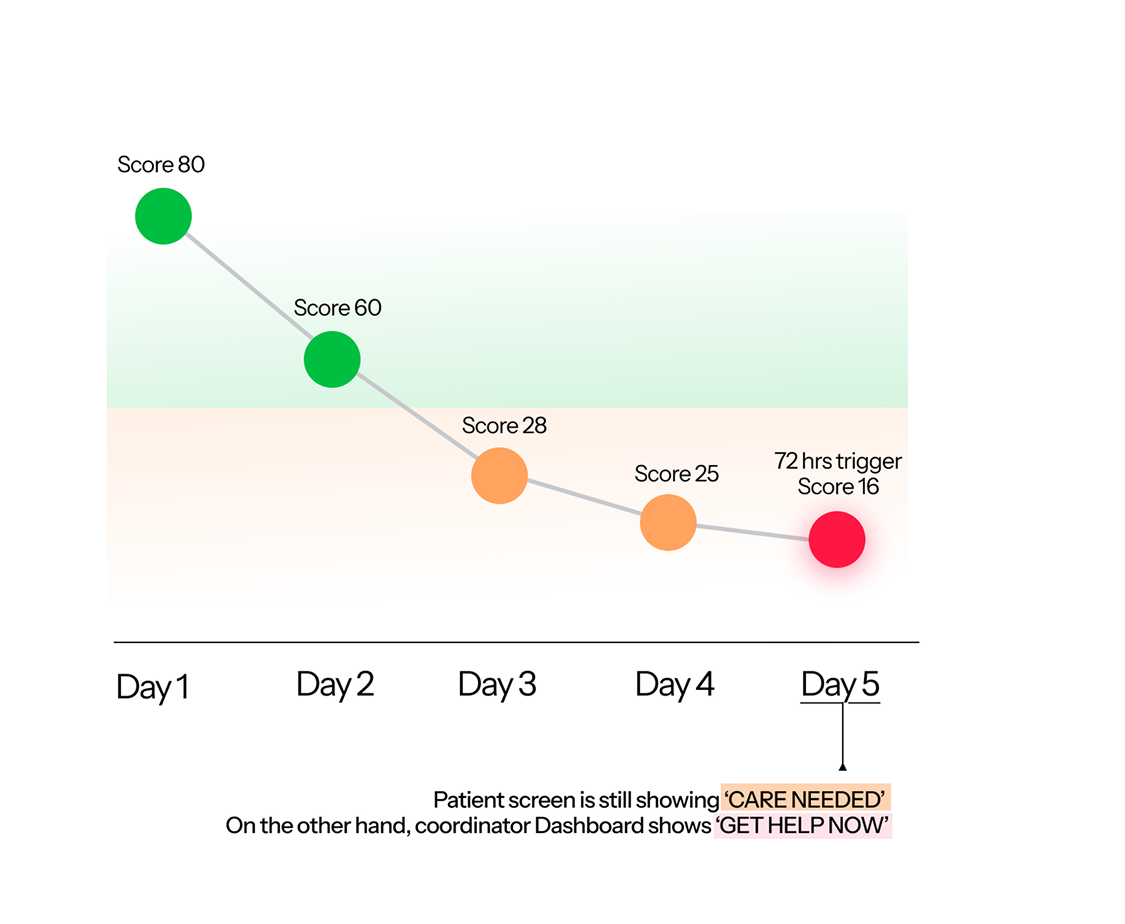
Flare-ups (exacerbations) usually show small symptoms about three days early. CODI sorts patients into three zones: green for steady, orange for care needed, red for get help now. The first day below 30, the patient gets a next step. Three days in a row, the coordinator gets an urgent alert.

App walk through
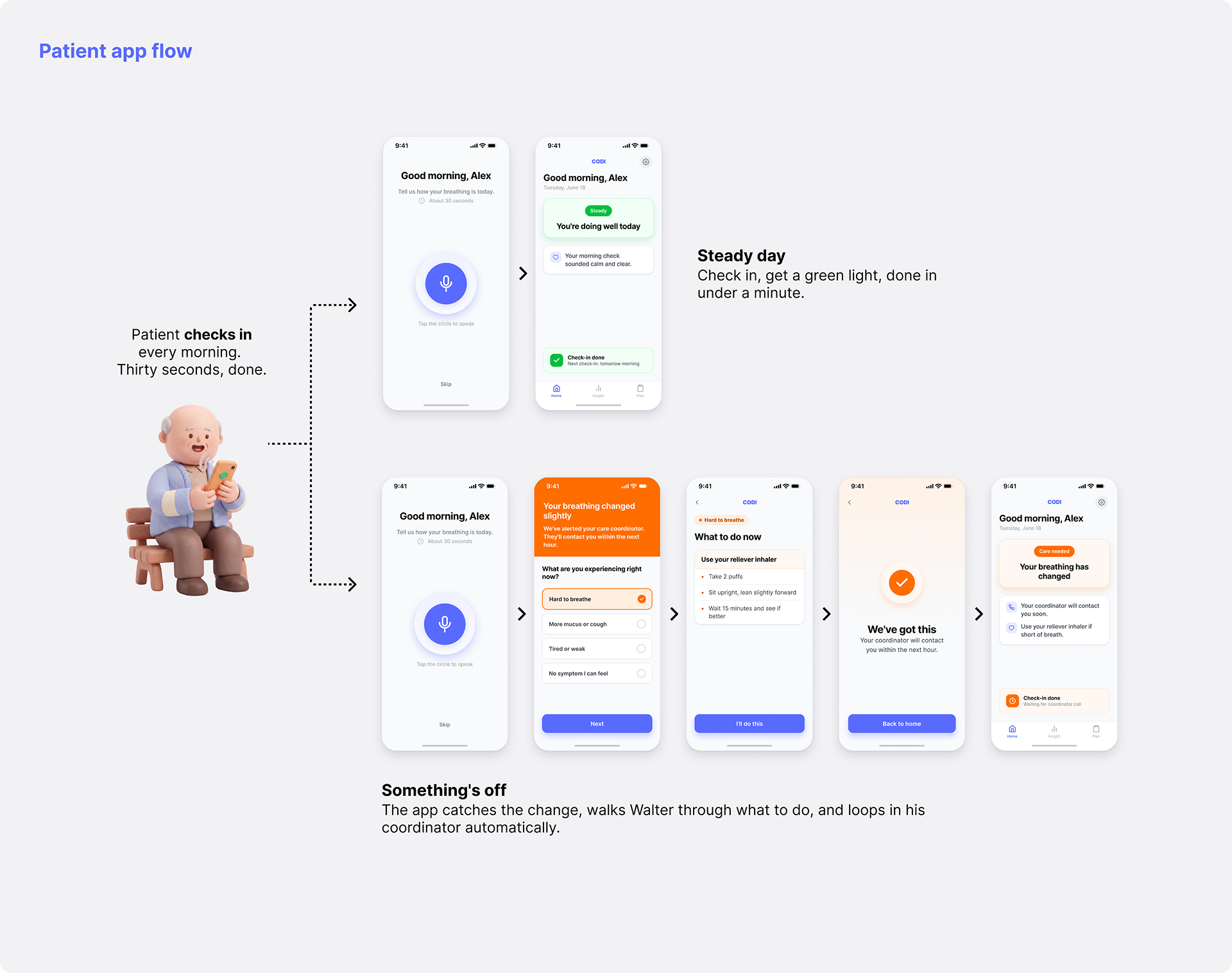
Every morning, the app opens with one prompt: "Tell us how your breathing is today." The patient taps the circle and talks for about 30 seconds. CODI scores that check-in, and the morning goes one of two ways: a steady day, or one that needs a coordinator's help.
Walter's problem was not knowing if today's symptoms were normal, or what to do about them. The app answers his three questions:
One simple status, steady or care needed, with no score to decode.
He taps what he feels, and the app shows clear steps for that symptom, like using the reliever inhaler.
His coordinator is alerted automatically and will call within the hour. He doesn't have to ask for help.
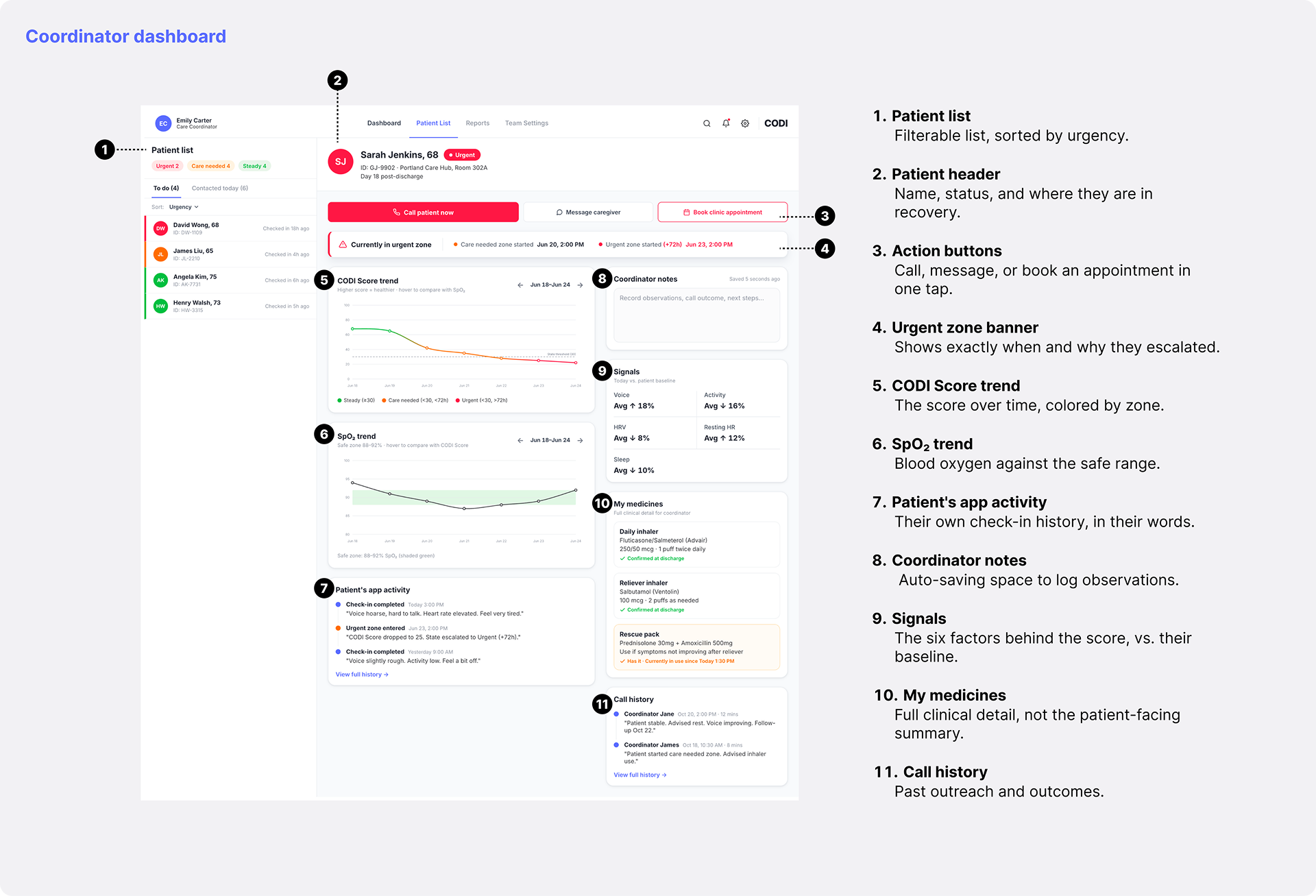
Sarah's problem was finding out too late, and hunting through charts to see why. The dashboard answers her three questions on one screen, in order:
The patient list is sorted by urgency, so the riskiest patient is always at the top.
The urgent banner shows when and why they escalated. The CODI Score trend and each signal against the patient's own baseline show what changed.
Call, message, or book an appointment in one tap.
Design decisions
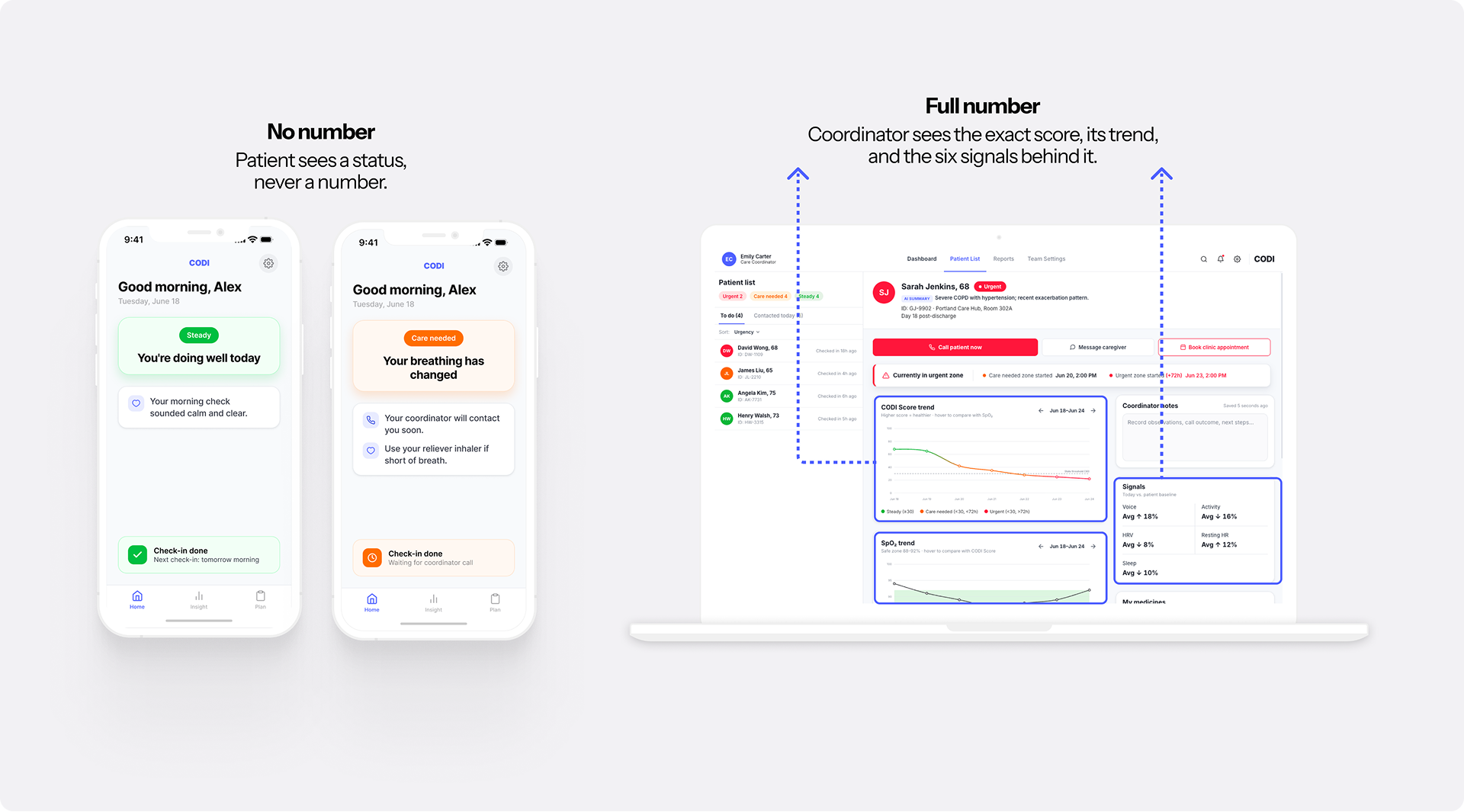
My colleague, the respiratory specialist, was clear: most COPD patients are elderly, and an exact score does them more harm than good, for two reasons:
- Fear. An exact number just makes them anxious.
- Hard to read. A raw score is hard to understand, especially for elderly patients.
The coordinator is different. A nurse or any clinical staff member wants the exact number and where it came from.
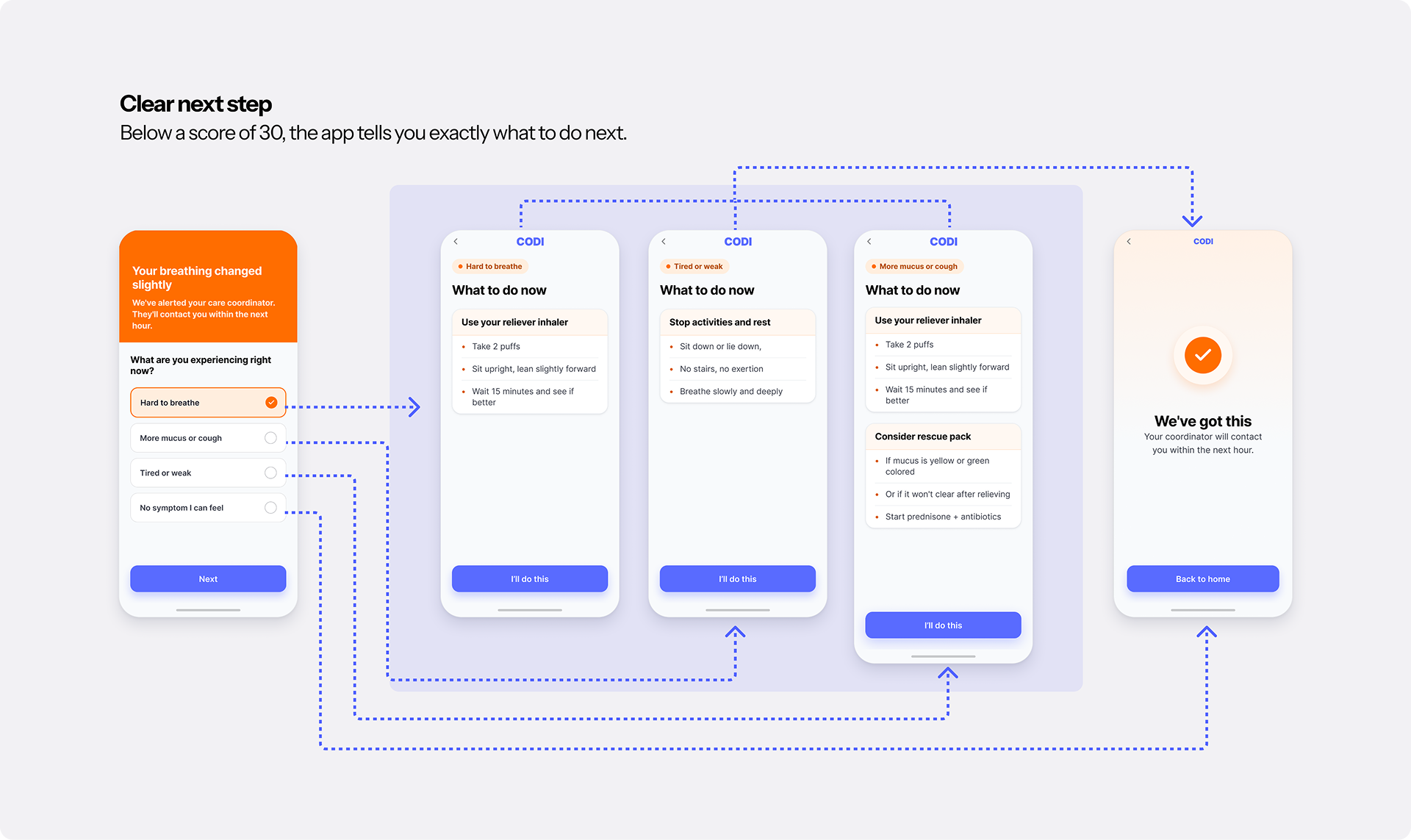
From our meetings, and from my own experience treating patients, people want clear instructions the moment they notice something's off. So I followed the American Lung Association's COPD Action Plan, the standard plan in the US: below a score of 30, the app asks what symptoms are present, then shows the matching next step.
For example, "Hard to breathe" leads to: use the reliever inhaler (2 puffs), sit upright, wait 15 minutes.
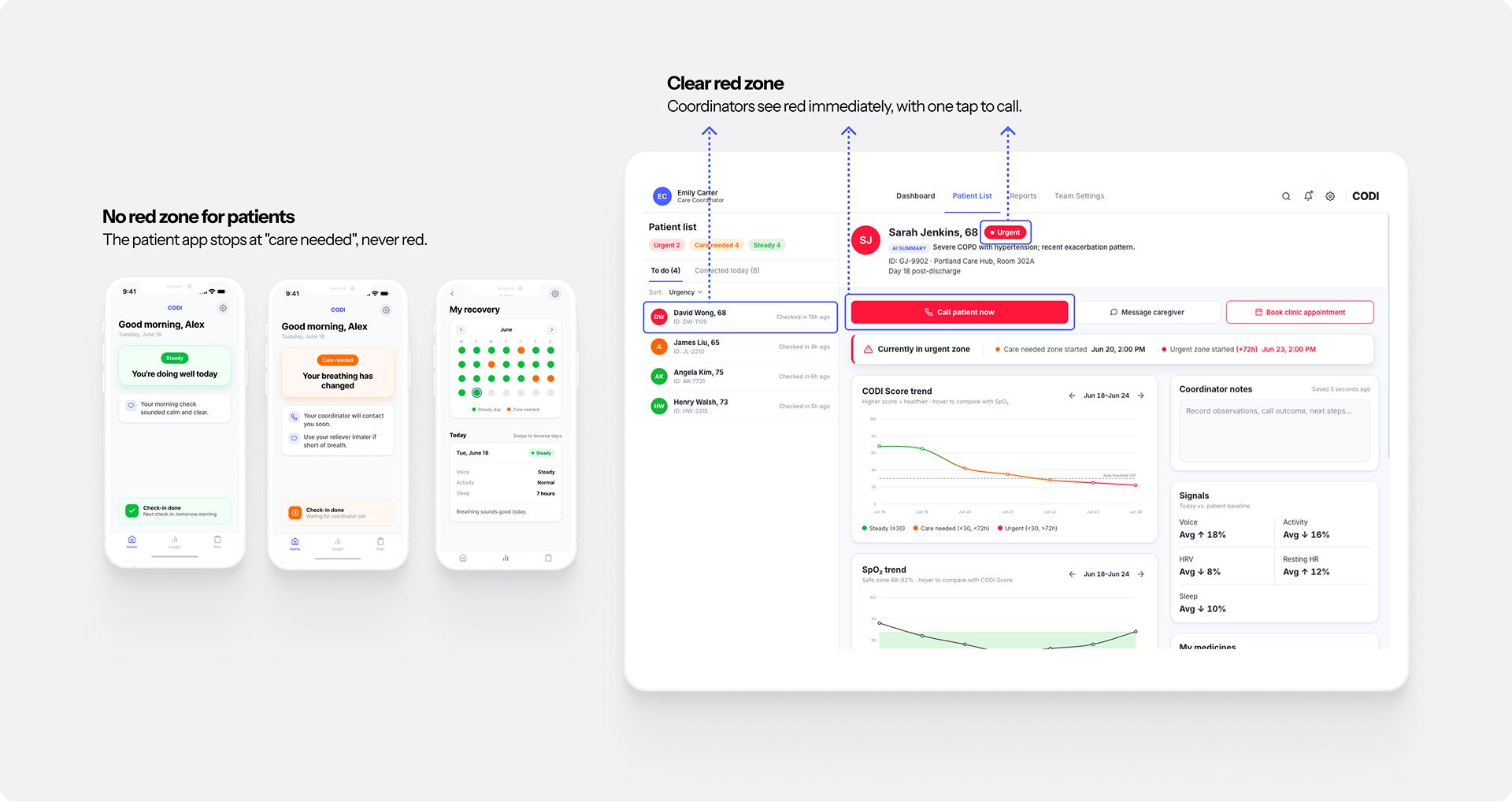
The CODI Score has a red tier for genuinely urgent cases. The patient app still stops at orange, "care needed," for two reasons:
- Fear. Showing red would only scare the patient.
- Same action anyway. Coughing calls for the same inhaler routine in orange or red.
Coordinators see the red zone clearly, so they can call right away.
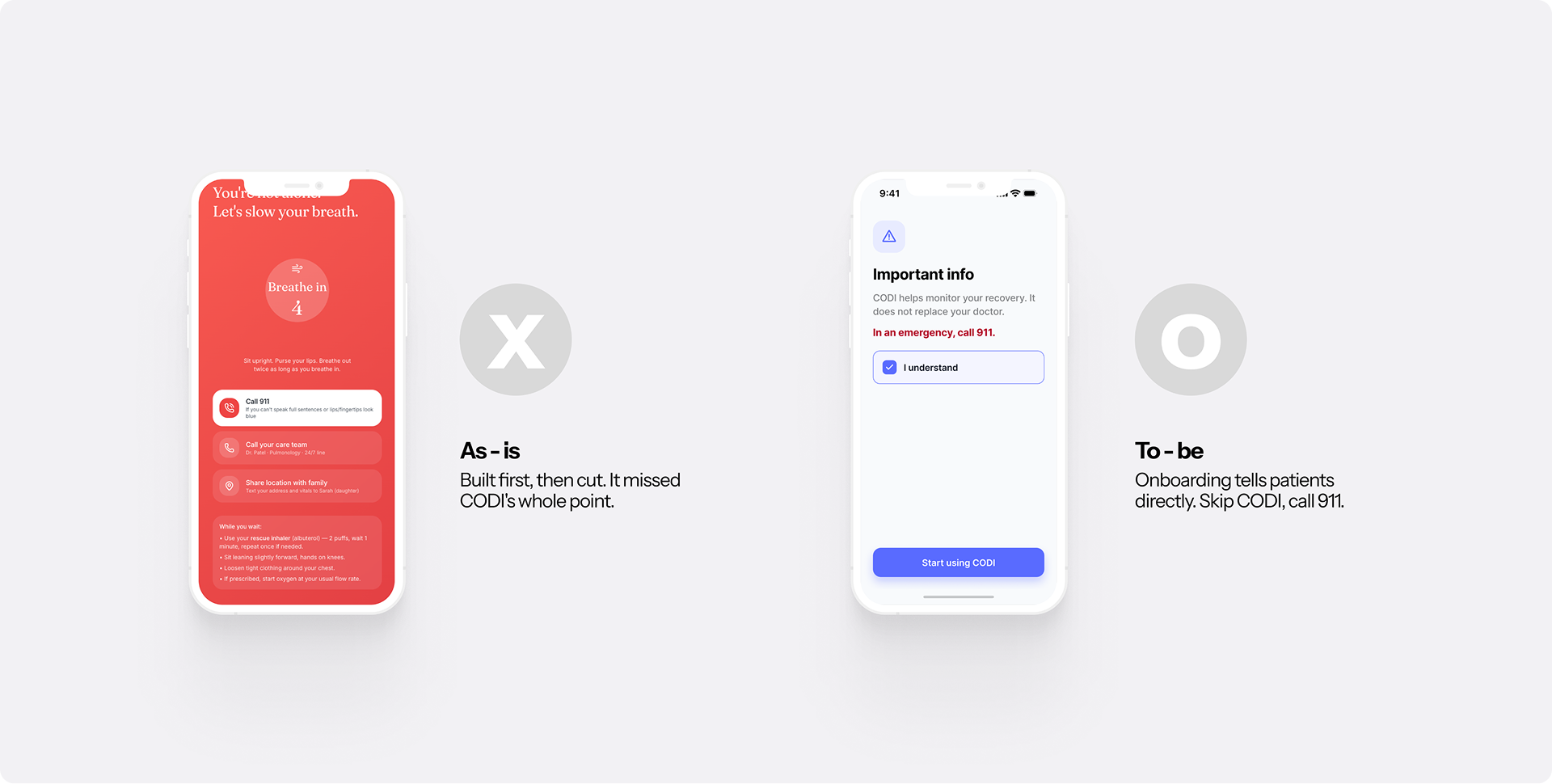
At first, I added an emergency button for sudden, severe attacks. I removed it for two reasons:
- Built to prevent emergencies. CODI spots changes days early, so care can start before things get serious. When an emergency does happen, the safest help is 911, so CODI sends patients there right away.
- Too slow. Someone struggling to breathe can't open an app and look for a button. Calling 911 directly is faster.
So onboarding tells patients clearly: in an emergency, skip CODI and call 911.
Design system
Every design system decision here starts from one thing: the user is elderly.
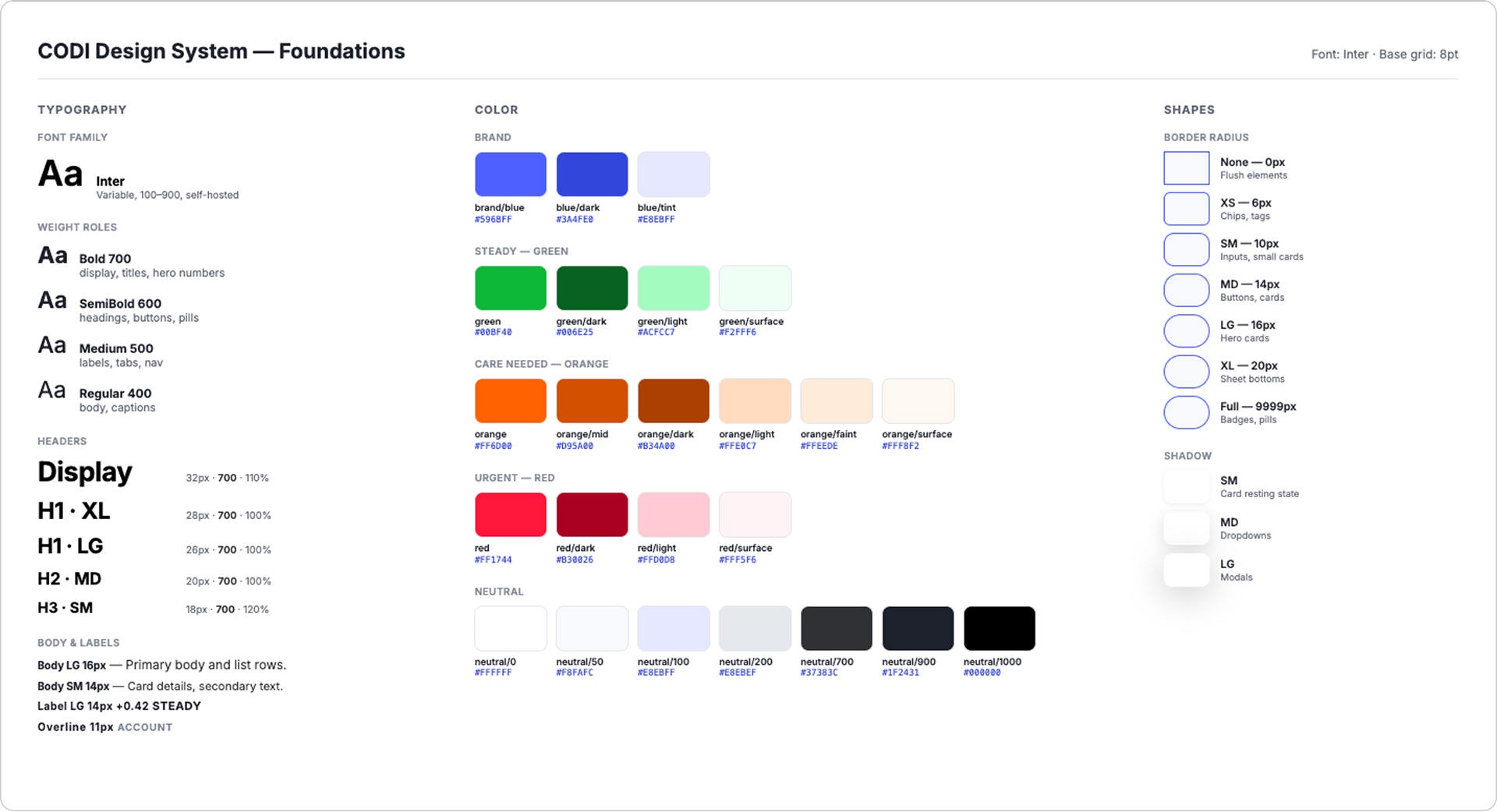
I started from Montage, the open-source design system from Wanted, a Korean job-search platform, chosen because it adapts cleanly across both mobile and desktop, which mattered since CODI needed a phone app and a web dashboard from the same system.
Bright, easy-to-read status colors, and Inter as the typeface.
Everything in the patient app is sized up for elderly hands and eyes, past the accessibility minimums:
Apple's minimum touch target is 44pt, so shaky hands still hit them easily.
Body text is 15–16px, screen titles 26–28px.
Main text is well above WCAG's AAA level (7:1).
Every status has a word or icon too, for patients with weaker color vision.
Every patient-facing screen stays as simple and direct as I could make it.
Usability testing
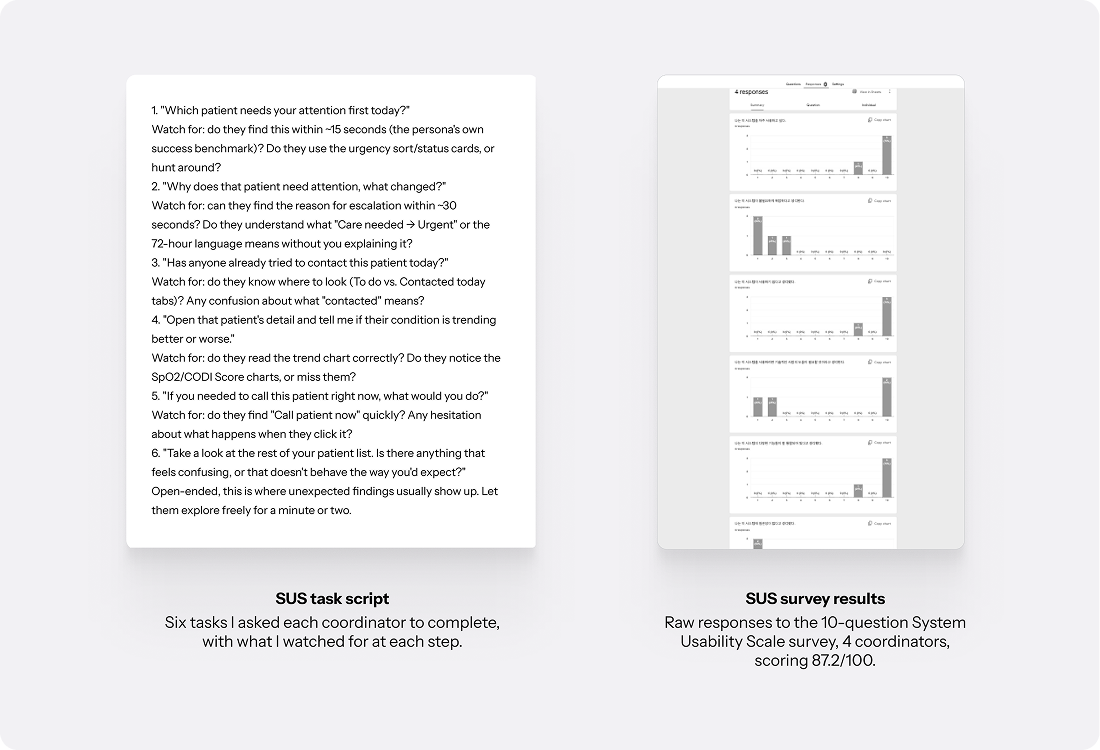
Coordinator dashboard. Testers came from my medical-school network: three Korean Medicine doctor friends and the respiratory specialist I worked with, four doctors in total. I ran it as moderated think-aloud testing, sitting beside each tester while they worked through the core task and narrated their reasoning out loud. Everyone completed it without guidance, and a follow-up SUS survey scored 87.2 out of 100 (n=4), well into the "excellent" range.

Key finding. The most important feedback came from the respiratory specialist, and it changed the dashboard.
He pointed out that COPD is tied to heart disease. A COPD score alone doesn't show the whole patient.
It matched my own experience treating patients: comorbidities like hypertension and diabetes always belong in the picture, not just the primary diagnosis.
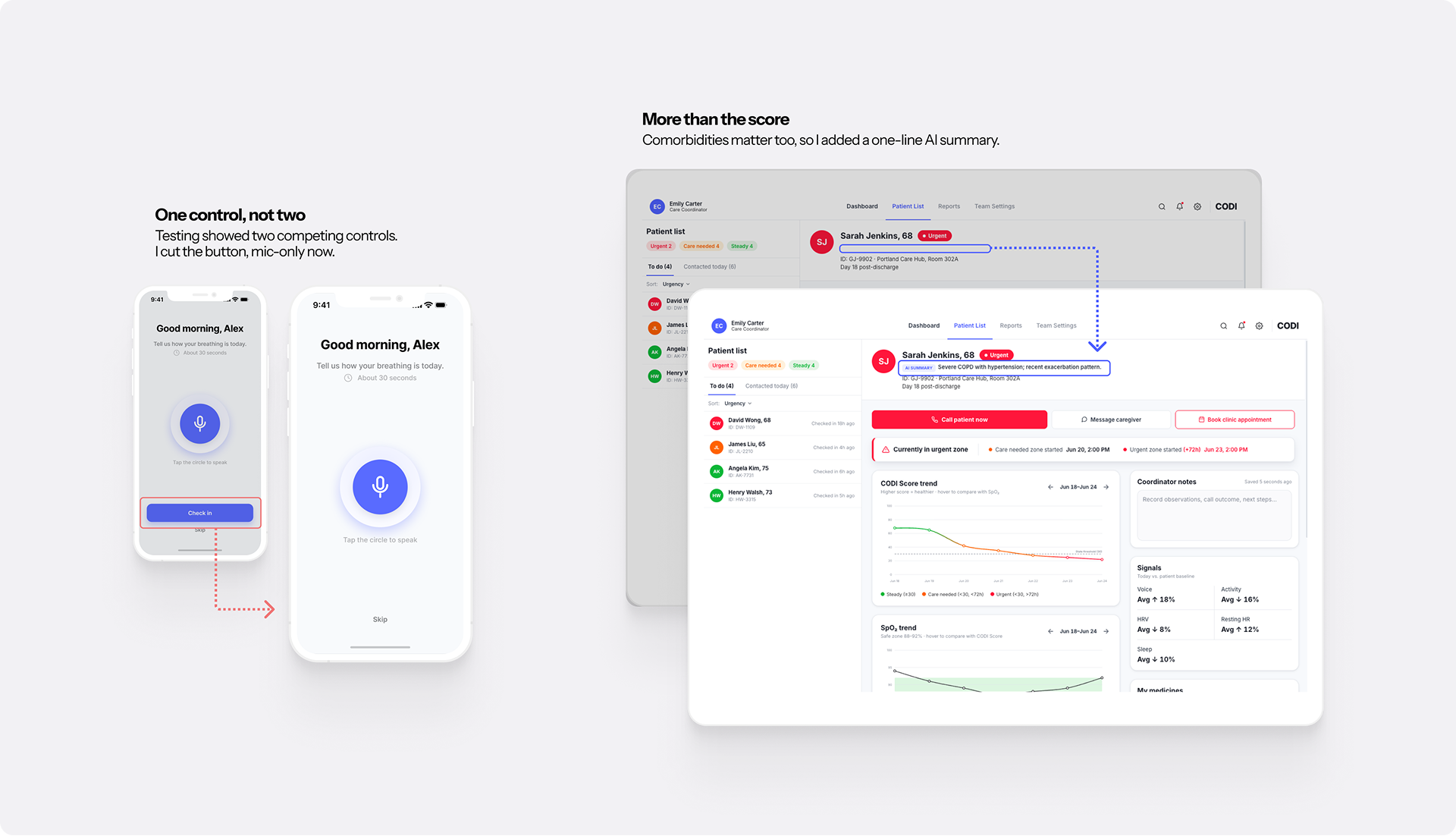
I added a one-line AI summary of the patient's overall status, right under their name, before any chart.
The two cards below show the patient header on the coordinator dashboard, before and after testing. As-is shows only the name and ID; To-be adds the AI summary right under the name.
Name and ID only. The coordinator has to dig through charts to understand the patient.
The patient's overall status in one line, before anything else.
Patient app. I ran an AI agent through the app configured as Walter, a simulated COPD patient, with every step of its reasoning recorded. The clearest finding: the voice button and the "next" control sat on the same screen, and the agent couldn't tell which one to use first. I removed the redundant control.
The image below shows both fixes on the full screens: the mic-only check-in on the left, and the whole coordinator dashboard with the new AI summary on the right.
What this could become
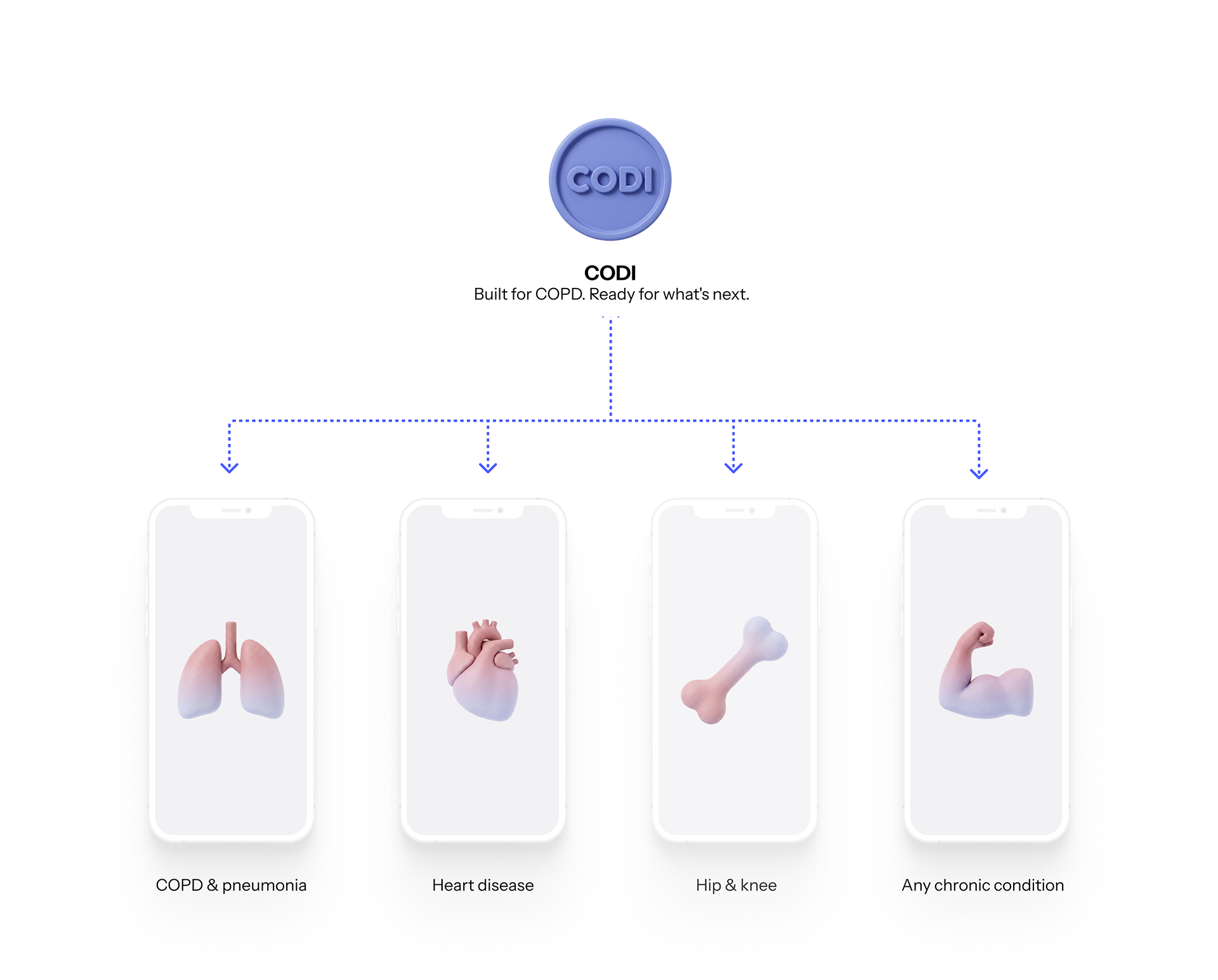
CODI was built for COPD, but the same case applies elsewhere. Medicare's Hospital Readmissions Reduction Program penalizes hospitals for six conditions: heart attack, heart failure, pneumonia, COPD, hip/knee replacement, and CABG surgery. Beyond that list, it applies to any chronic condition that gets managed rather than cured.
Working on this as both a doctor and a designer changed what I paid attention to. Treatment was never the whole story. The everyday friction around it mattered just as much. That's the perspective I want to keep bringing to healthcare products.